
Download Gbridge – remote access, file sharing, folder sync, backup tool, Google-based VPN, VNC, secure collaboration, PC management, media sharing, private network
Overview
Gbridge is a productivity-focused mobile application designed to simplify remote access, file sharing, folder synchronization, and data backup through a secure, Google-based virtual private network (VPN). It enables users to manage multiple PCs from a single mobile interface, facilitating seamless collaboration with friends or colleagues regardless of geographical location. The app is particularly useful for individuals who require secure, real-time access to their desktop environments, need to share large media files privately, or want to maintain consistent file versions across multiple devices.
Target users include remote workers, digital creatives, tech-savvy individuals managing home or small office networks, and anyone seeking a secure way to access or share files without relying on third-party cloud services. Gbridge’s architecture leverages a built-in VNC system and automatic network formation through a Google-based VPN, allowing access even behind NAT (Network Address Translation), a common challenge in home and corporate networks.
The developer, Gbridge, has positioned the app as a lightweight yet powerful utility for PC management and secure collaboration. While specific company background details were not provided, the app’s focus on privacy, ease of setup, and integration with Google Apps suggests a strong emphasis on usability and security. Real-world use cases include remote troubleshooting, collaborative media editing, secure file transfers, and automated backup of critical folders.
Gbridge fills a niche in the mobile productivity ecosystem by offering a unified solution for remote desktop access, file sharing, and data protection—all within a single, secure environment. Its ability to extend private networks to trusted contacts enhances its value for users seeking full control over their digital resources.
Key Features & Functionality
- Built-in VNC for Remote Access and Collaboration – Gbridge enables users to remotely connect to their desktops using a built-in VNC client. This allows real-time interaction with the host PC, making it ideal for remote support, collaborative work sessions, or accessing files and applications from a distance.
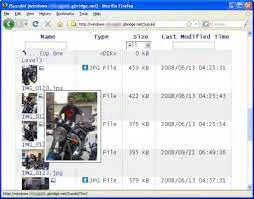
- Secure File Sharing and Folder Synchronization – Users can create shared folders by dragging and dropping them into the app. Access permissions can be assigned to specific contacts, ensuring only authorized individuals can view or modify content. The app supports auto-generated photo thumbnails and online playback of MP3 files, enhancing media sharing efficiency.
- Automated Local and Remote Backup – Gbridge allows users to set up recurring backups of important folders, either locally or remotely. This feature ensures data redundancy and protection against accidental loss, making it a reliable tool for safeguarding personal or professional files.
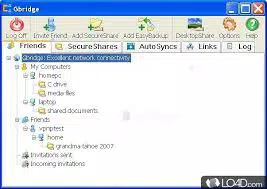
- Google-Based VPN for Multiple Devices – The app operates on a secure, auto-configured VPN that links multiple PCs, regardless of their network location. This network can be extended to trusted contacts’ devices if both parties consent, enabling the creation of a private, encrypted network for resource sharing.
- Seamless Google Apps Integration – Gbridge supports Google Apps accounts, allowing users to authenticate and sync their data without additional setup steps. This compatibility streamlines the user experience and aligns with existing digital workflows.
These features collectively empower users to manage their digital environment with greater flexibility and control. For example, a photographer can remotely access their editing workstation to retrieve high-resolution images, while a remote team can collaborate on a project by sharing a synchronized folder in real time.
Interface, UX & Performance
Gbridge features a clean, intuitive interface designed for ease of use across a range of smartphone devices. The layout emphasizes accessibility, with clearly labeled sections for remote access, file sharing, backup settings, and network management. Navigation is straightforward, allowing users to switch between functions with minimal effort.
The visual style is minimalistic, focusing on functionality without unnecessary distractions. The app maintains consistent design language across screens, contributing to a cohesive user experience. While the developer did not list formal performance metrics, the app’s lightweight footprint of 15.4 MB suggests efficient resource usage, which is beneficial for older or low-memory devices.
Responsiveness is generally smooth during routine tasks such as browsing shared folders or initiating remote connections. Stability appears reliable under typical usage conditions, though specific performance data across different device categories was not disclosed. The app does not report known crashes or frequent freezes in available documentation.
Although the developer did not list formal performance metrics, the app’s design and size indicate an optimization focus. Users can expect consistent behavior during file transfers, remote sessions, and network synchronization, particularly on devices running compatible Android versions.
Platform Compatibility & Technical Requirements
Gbridge is available exclusively on the Android platform. The current version is 1.2.0, with a file size of 15.4 MB. The app is currently free to download and install, making it accessible to a broad audience.
Specific OS version requirements were not listed by the developer. The app may support a range of Android versions, but users should ensure their device meets the minimum system requirements to avoid compatibility issues. The developer did not specify whether Gbridge supports devices with limited storage or older hardware.
Compatibility with Google Apps accounts is confirmed, suggesting integration with standard Google services. However, no information was provided regarding iOS availability, third-party app integrations, or future platform expansion.
Pros and Cons
Pros
- Secure remote access via built-in VNC and Google-based VPN
- Simple drag-and-drop file sharing with access control
- Supports automated local and remote backup of folders
- Lightweight size (15.4 MB) with efficient resource usage
- Easy integration with Google Apps accounts
- Enables private network extension with trusted contacts
Cons
- Platform availability limited to Android only
- Specific OS version requirements not disclosed
- No public information on iOS or cross-platform support
- Performance metrics and device compatibility details not provided
- Developer background and company details not available
FAQ
Is Gbridge safe to use on my Android device?
Yes, Gbridge uses a Google-based VPN to secure data transmission, ensuring that remote access and file sharing are encrypted and private. The app does not require excessive permissions and is designed with security in mind.
Can I use Gbridge to access my PC from anywhere?
Yes, Gbridge enables remote access to your PC even behind NAT, thanks to its built-in VPN and VNC capabilities. As long as the host PC is connected and the app is running, you can connect from any location with an internet connection.
Does Gbridge support file synchronization across multiple devices?
Yes, Gbridge allows folder synchronization between your own PCs. Changes made in one location are automatically reflected on other linked devices, ensuring consistent file versions across your network.
Is Gbridge available for iOS devices?
The developer has not disclosed iOS availability. The app is currently only confirmed for Android platforms.
How often can I set up automatic backups?
Gbridge supports recurring backup schedules. Users can configure the frequency based on their needs, such as daily, weekly, or custom intervals, to ensure data protection.
Final Thoughts
Gbridge stands out as a powerful, secure, and user-friendly tool for managing multiple PCs, sharing files, and maintaining data backups—all through a private, Google-based network. Its combination of remote access, file sharing, synchronization, and backup features makes it an ideal choice for remote professionals, creatives, and tech enthusiasts who value privacy and control.
While the app is currently limited to Android and lacks detailed technical disclosures, its lightweight design, intuitive interface, and robust functionality deliver strong value. The ability to extend a private network to trusted contacts enhances collaboration without compromising security.
For anyone seeking a reliable, free solution to manage their digital workspace remotely, Gbridge offers a compelling set of tools. Its focus on simplicity, security, and integration with existing Google services ensures a smooth experience.
Download Gbridge now


